

 Español
 English
 Български
 Čeština
 Dansk
 Deutsch
 Ελληνικά
 Eesti keel
 Suomi
 Français
 Gaeilge
 Hrvatski
 Magyar
 Italiano
 Lietuvių kalba
 Latviešu valoda
 Malti
 Nederlands
 Polski
 Português
 Română
 Slovenčina
 Slovenščina
 Svenska
HOW IT WORKS · ROYAL DECREE 1215/1997
How Slynga works, from start to finish
From registering the accessory to the inspection logbook for the auditor, via the operator's app and integration with your ERP.
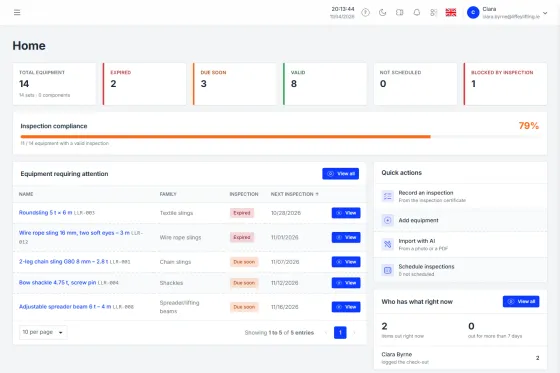
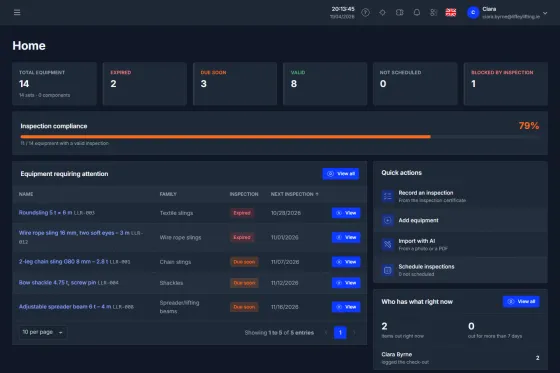
From registering an item to the auditor's logbook
Five steps. None needs paper and none needs prior training.
01INVENTORY
Register your equipment with AI
Photograph the marking or upload the manufacturer's certificate. The AI fills in WLL, standard, CE marking and manufacturer; families supply the inspection interval and mandatory documents.
02TAGGING
Tag with QR and NFC
Print QR labels in batches or program NFC tags. Each accessory gets a unique ID: one tap and you have its record and its history.
03FIELD
Inspect and move items in the field
The operator uses the app: pre-use check (pass or fail), check-out and return with geolocation. If it fails, check-out is blocked.
04INSPECTIONS
Upload the formal inspections
Upload the external inspector's certificate with its result. Slynga works out the next due date and alerts you before it expires.
05COMPLIANCE
Prove traceability
Share the inspection logbook via a tokenised URL: the auditor gets in without an account. Everything is logged with its author and date.
THE RESULT
A real logbook, open, no sign-up
See a sample logbook →
The full life of every accessory
From the moment it enters the inventory to every inspection and movement. Nothing gets lost, everything is logged.
IN THE WAREHOUSE
The accessory comes in with its compliance record and leaves identified by QR or NFC.
Registration
The accessory enters the inventory with its compliance record.
Tagging
It's given a unique, permanent QR code or NFC tag.
IN THE FIELD
Every movement records who has it, when and where.
Check-out
The operator checks it out: pre-use check and pick-up location.
In use
It's assigned to a named person, with active custody.
Return
Back into stock: return check and geolocation.
COMPLIANCE
What the auditor needs, already assembled, with nothing to prepare.
Inspection
Formal inspections and their results are recorded.
Retirement
At the end of its service life it's retired; its record is kept.
Digital logbook
The full history, available to the auditor via a link.
The same accessory, two moments
You don't have to take the journey on trust: every step leaves a record you can query via the API.
ILLUSTRATIVE EXAMPLE
WHEN CHECKED OUT ON SITE
{ "type": "checkout", "equipment": "A-00417", "operator": "J. Marín", "pre_use": "pass", "location": [39.4699, -0.3763], "at": "2026-09-14T09:41:00Z"}AFTER THE INSPECTION
{ "type": "inspection", "equipment": "A-00417", "result": "pass", "certificate": "OCA-2026-114.pdf", "next_inspection": "2027-01-10", "at": "2026-09-16T12:05:00Z"}GEOLOCATION
Pick-up and drop-off, pinned on the map
Every check-out and every return records its location and time. You know where an accessory was picked up, where it was dropped off and who had custody of it.
- GPS position on check-out and return
- Timestamp and responsible operator
- Movement history per item
- Useful on sites, across locations and for third-party service
Pick-up
Drop-off
OPERATOR APP
The field, in the operator's pocket
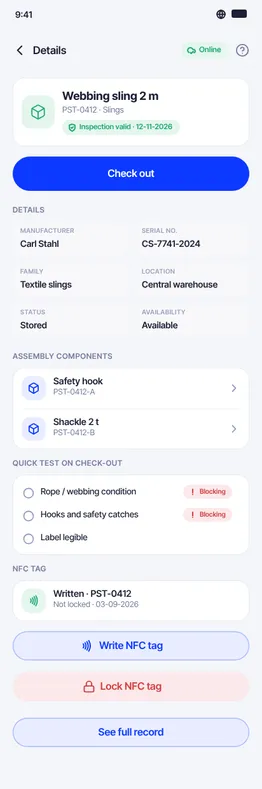
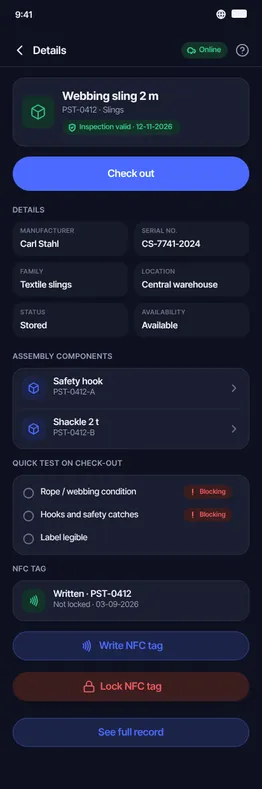
Native apps for Android and iOS, designed to be used with gloves on, on site or in the warehouse. The operator scans, checks and moves equipment without paperwork.
Native Android and iOS apps
Works on weak mobile data and in full sun, even with gloves on.
QR and NFC scanning
One scan or one tap brings up the record, the history and the actions.
Pre-use check
Guided UNE-EN checklist: pass or fail. A fail blocks use.
Custody with location
Check-out and return with geolocation and timestamp.
INTEGRATION
One API, and you connect to whatever you use
A REST API to query inventory, inspections and movements from your systems, and webhooks that notify them when something changes. No duplicate data, no keying things in twice.
Documented REST API
Keys per environment and public documentation, for integration without surprises.
Query items and documents
Items, locations and documents, with no duplicate data and no keying things in twice.
Event webhooks
Your ERP hears about it straight away: an inspection coming due, an item out of service, a check-out refused. Signed, with no personal data, and retried for almost 15 hours.
Bulk import and export
Start from your spreadsheet and take your data with you whenever you like.
For example, with:
- SAP
- Microsoft Dynamics
- Sage
- Odoo
ILLUSTRATIVE EXAMPLE
GET /api/public/v1/equipment/{id}→ 200 OK{ "name": "Cadena grado 8", "tracking": "A-00417", "serial_number": "SN-24117", "status": "en_uso", "max_load": 3150.0, "next_revision_date": "2027-01-10", "revision_status": "green"}GETTING STARTED
No never-ending migrations
You start with demo data included, register your equipment with AI, and within a day your inventory is digitised. Our team supports you through onboarding.
See all features →- Demo data to get you started
- AI import of your inventory
- Onboarding support